Receive the change
A new hire, role change, location change, or departure is recorded in your connected HR or payroll system.
UMA | Employee lifecycle automation
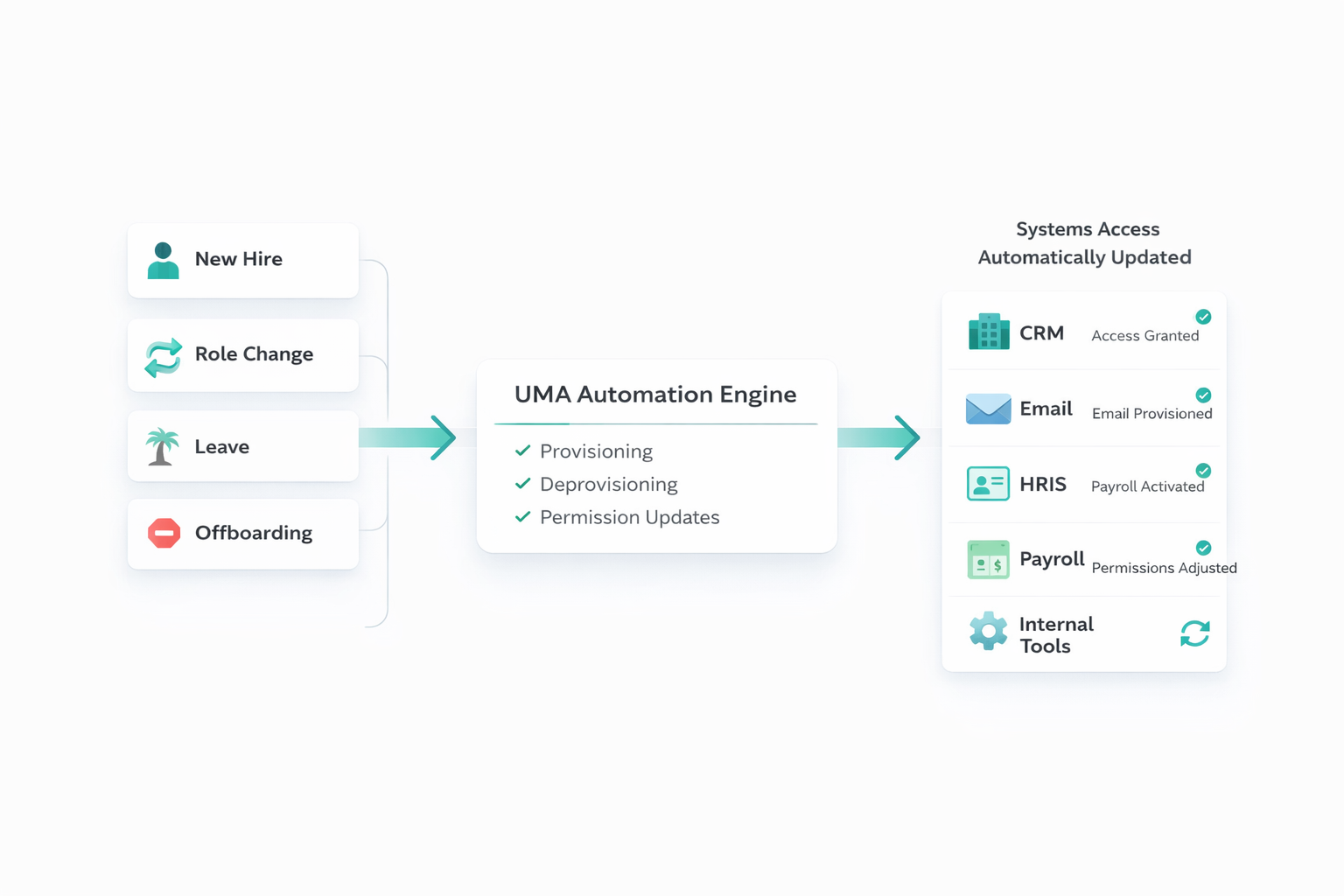
AvailableUMA starts when a change is recorded in your HR or payroll system. It applies your role and location rules to connected applications, completes supported access actions, and assigns the remaining work to a person with follow-up and confirmation.
The workflow
UMA is for growing businesses and multi-location organizations that want employee changes to trigger clear access work without replacing the HR and identity systems they already use.
A new hire, role change, location change, or departure is recorded in your connected HR or payroll system.
UMA uses the employee’s role, responsibilities, location, and status to determine which connected-system actions and tasks apply.
UMA completes supported account and access changes. When an application or physical task needs a person, UMA assigns an owner, due date, and instructions, then follows up and escalates overdue work according to the configured process.
UMA records attempted actions and confirmations. Where an application exposes readable access data, UMA can check it against the approved rules and route or correct supported differences.
Switch between New hire, Role change, and Departure to see automatic actions and assigned tasks side by side.
Systems and setup
Your HR or payroll platform remains the employee system of record. UMA uses supported integrations to coordinate downstream access; exact actions depend on each application’s API, plan, permissions, and your configuration.
Connection methods vary. Supported applications may use SCIM, SSO, APIs, or another supported method. For example, Slack SCIM actions depend on the Slack plan and authorization. A method’s availability does not mean every action is supported.
After the system of record is connected, supported manual workflows can assign an owner and due date, send instructions and reminders, escalate overdue tasks, and record confirmation while an access integration is being built. Confirm which manual workflows are available for your required applications during scoping.
Background checks and learning management system connections can coordinate screening and required training. Confirm the provider, supported steps, status return, and any required licenses during setup.
Compare fit
These products overlap in lifecycle automation, but differ in their source of truth, scope, and delivery model. Compare them using the same HR event, applications, access changes, manual exceptions, and evidence of completion.
Okta describes lifecycle management for importing identities from HR systems and automating joiner, mover, and leaver actions across its application ecosystem. It may fit organizations standardizing identity lifecycle and authentication around Okta. UMA focuses on coordinating HR-driven access work across its supported operational-app connections, including tracked manual work. UMA does not currently have a native Okta endpoint integration.
Okta Lifecycle ManagementMicrosoft Entra Lifecycle Workflows automate tasks for Entra users and can be extended with Logic Apps. They may fit teams whose lifecycle processes are centered in Entra and its governance licensing. UMA can sit alongside an existing identity provider, but does not currently have a native Microsoft Entra endpoint integration; confirm how employee events and app actions would connect in your environment.
Microsoft Entra Lifecycle WorkflowsRippling presents a broader HR and IT platform with employee-data-driven access, device, and workflow products. It may fit organizations looking to consolidate those functions. UMA is focused on coordinating access from an HR or payroll source across selected connected applications, including integrations Workmind builds for agreed customer requirements.
Rippling ITBetterCloud presents SaaS management, application workflows, and user onboarding/offboarding automation. It may fit teams seeking broad SaaS administration and workflow controls. UMA focuses on HR-triggered lifecycle work, selected operational-app access, and completion tracking for assigned tasks.
BetterCloud platformCompetitor descriptions summarize their current official product pages, reviewed November 13, 2026. Features, packaging, licenses, and integrations vary; confirm the exact configuration with each provider.
Pricing and implementation
UMA is $200 per location per month. Annual prepayment includes the published 15% discount. Integration builds are scoped separately and depend on access, platform capabilities, permissions, and agreed actions.
Rule configuration can take a few hours once requirements are organized.
Questions to resolve before rollout
No. Paycor or BambooHR remains the employee system of record. UMA can work alongside an existing identity provider, but it does not currently have native Okta or Microsoft Entra endpoint integrations.
No. Available actions depend on the application’s API, plan, permissions, and your configuration. Confirm each required action during scoping.
Where a supported manual workflow is available, UMA assigns the task and owner, sends instructions and follow-up, and tracks confirmation. The specific manual path and escalation rules are confirmed during setup.
UMA Native contractor records and access workflows are planned, not currently available.
Bring your HR source, applications, role rules, and one example of a task that still needs a person.
Schedule a demoCopyright (c) 2026, Workminc Inc; all rights reserved.
Template by Bootstrapious. Ported to Hugo by DevCows.