
Employee access management has four jobs:
- Provision access when someone joins the organization.
- Change access when the person’s job, location, or responsibilities change.
- Remove access when the person leaves or no longer needs it.
- Verify access to confirm that the person’s actual permissions still match the rules.
Every organization needs a reliable way to handle all four. This is no longer a nice administrative extra. It is part of basic security.
SOC 2 examinations and HIPAA requirements do not generally prescribe a specific access automation product. They focus on whether access controls are defined, followed, reviewed, and supported with evidence. HIPAA guidance, for example, calls for organizations to establish, document, review, and modify a user’s access according to their authorization policies.
We are no longer in an era when a small business runs on one piece of software. Current industry reports place the average company SaaS stack at roughly 100 applications. The exact number varies by company size and by whether a report counts only approved applications or also discovers departmental and employee-selected tools. The important point is that even a small organization now depends on many separate systems.
A home-service franchise may use HR and payroll, a CRM, estimating, scheduling and dispatch, payment processing, accounting, customer messaging, file storage, training, and marketing software. A medical practice may use HR and payroll, an electronic health record, scheduling, billing, payments, labs, telehealth, email, and compliance training. A retail or event business will have a different list, but it will still have multiple applications with different accounts, roles, and administrators.
Not every employee needs every application, and not every application supports automated provisioning. That is exactly why manual coordination becomes difficult to perform consistently and difficult to prove later. Automation turns the access process into a repeatable control instead of a collection of reminders and assumptions.
Consider an employee who gets promoted on Monday.
By Tuesday, she can open the manager dashboard. She can also still see information from her old role. One system she needs now says “permission denied.” Three access tasks are marked complete.
Was she provisioned? Yes.
Is her access correct? No.
That difference is the reason access verification matters.
The short answer
Automated user provisioning creates, updates, suspends, or removes employee accounts and permissions when something changes in an authoritative system, such as HR or payroll.
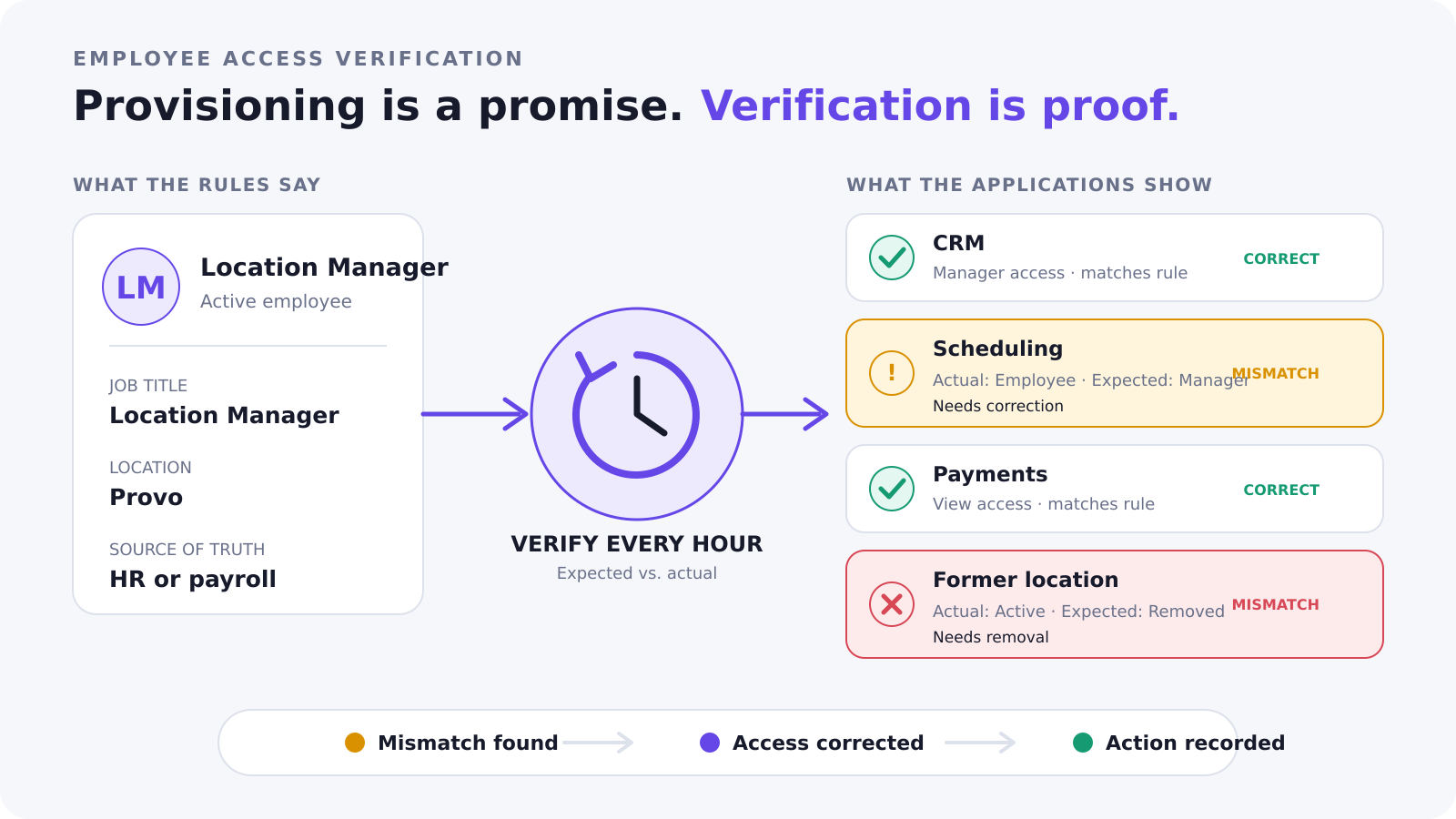
Employee access verification compares the access a person should have with the access they actually have now.
Provisioning sends the instruction. Verification confirms the result.
| Question | Provisioning | Verification |
|---|---|---|
| What should happen? | Create, change, or remove access | Compare expected access with actual access |
| When does it happen? | Usually after a hire, role change, leave, or termination | After a change and on a repeated schedule |
| What does success mean? | The requested action was sent or completed | The person’s current access matches the rules |
| What can it catch? | Known employee events | Failed updates, manual changes, missing access, and extra access |
Provisioning is a promise. Verification is proof.
Why access does not stay correct
An account can be created correctly and become wrong later.
- An administrator changes access manually.
- An integration fails.
- An employee gains access for a new job but keeps access from the old one.
- Someone grants an exception but does not record it.
- An employee loses a permission they still need.
- A former employee’s account remains active after everyone assumes it was removed.
The difference between expected access and actual access is often called access drift.
Role changes are especially easy to mishandle. Hiring and termination have clear boundaries. A new employee needs access. A departing employee should lose it.
A role change requires more thought. The employee may need new access added, old access removed, and some access left alone. Companies often remember to add the new tool and forget to remove permissions from the former job.
A role change should not mean, “Add one more permission.” It should mean, “Check this person’s full access against the requirements of the new job.”
SSO, provisioning, and verification solve different problems
Single sign-on is useful, but it does not prove that application access is correct.
SAML primarily helps a person authenticate through an identity provider. Some applications use SAML for just-in-time account creation, but full provisioning and deprovisioning usually require SCIM or an application-specific API. Microsoft’s provisioning guidance also treats SAML JIT, SCIM, and API-based provisioning as different options.
Even after someone signs in successfully, they may have the wrong role, group, location, or permission level inside the application.
- Authentication asks, “Is this person who they claim to be?”
- Provisioning asks, “What account or permission change should we make?”
- Verification asks, “Does the person’s actual access match the current rules?”
A complete process needs the right answer to all three questions.
Five questions your access process should answer
You can test any manual process or access-management product with five questions:
- What is the authoritative source for each employee’s status and job information?
- Which employee information determines access?
- What access should each job, location, or approved exception receive?
- How do you confirm that each application actually made the change?
- How are failures, manual actions, and exceptions documented?
If your process cannot answer all five, provisioning may be happening without verification.
That does not mean every step must be automated. Some applications do not expose the APIs or controls needed to manage access. A person may still need to complete the change manually.
Manual work is not automatically bad. Hidden manual work is the problem. A manual requirement should remain visible, assigned, completed, and recorded.
Different organizations need different access models
Some organizations need several layers of identity governance. Employees may hold multiple roles, work on temporary projects, use several directories, or require specialized approvals. Products such as Okta and Microsoft Entra are built to support those environments.
Those capabilities are valuable when the organization needs them. They can also require broader licensing, configuration, implementation, and administration. Product pricing varies, and an existing Microsoft agreement may change the cost comparison. The right question is not whether an enterprise identity product is good or bad. The question is whether its operating model fits the business.
Many franchises, small and midsize businesses, medical practices, and other multi-location organizations have a more direct access model. Their employees often work in a defined set of repeatable jobs.
A field technician needs the systems used to complete service work. A dispatcher needs scheduling and customer communication tools. A location manager needs operating and reporting access for the locations they manage. A medical front desk employee needs the scheduling and patient-service access approved for that practice. An event coordinator may need registration and vendor-management access without receiving finance permissions.
For many of these organizations, job title plus location can provide the main access rule. Healthcare may require another approved attribute, such as department, provider status, or clinical responsibility. The goal is to use the smallest set of authoritative employee information that determines access correctly.
The company should be able to explain the rule:
This employee has this access because they hold this job at this location.
If locations share one external account and the same API credentials, rules can be managed centrally. If each location has its own external account, those environments can be separated into sub-accounts. Headquarters can keep common rules while allowing controlled differences where the business requires them.
The question is not which model is more advanced. The question is which model accurately reflects how the organization operates.
Why actual access matters for compliance
An exception is not always wrong. A company may have a valid reason to give one person different access.
The exception should still be authorized, limited to the business need, documented, and reviewed. When appropriate, it should have an end date.
An undocumented exception creates a gap between the company’s stated rules and the access that actually exists. The company may not be able to explain who approved it, why it exists, or whether it is still needed.
Many security and compliance frameworks expect organizations to authorize access according to role or business need, review accounts, update access when responsibilities change, and document how controls operate. The HIPAA Security Rule, for example, requires appropriate authorization for workforce members who use electronic protected health information and requires regulated organizations to evaluate and document their safeguards.
A written policy does not prove that a control is working. The actual access has to match.
Why Workmind built UMA
Workmind built the User Management Agent, or UMA, for organizations that need a clear connection between employee information and operational access without forcing every access decision through a large identity-governance project.
UMA uses HR or payroll information as the employee source of truth. Deterministic rules map approved information, such as job title and location, to the access required in each connected system. UMA does not use AI to guess who should have access.
Every hour, UMA compares expected access with actual access. When a connected application supports the required action, UMA corrects the difference and records the result. When automation is not supported, the manual requirement must remain visible and tracked.
UMA can also work alongside Okta or Microsoft Entra. An organization may use its existing identity provider for authentication and the applications it already manages, while using UMA for HR-driven rules and verification across operational systems. UMA does not yet have native Okta and Microsoft Entra integrations, so “works alongside” does not mean UMA currently manages either product as a connected endpoint.
Integration coverage is never automatic. Okta and Microsoft Entra support standard and custom integration methods, including SCIM. UMA is designed to connect with operational systems through the APIs and permissions those systems expose. In every case, the customer plan, available API, security requirements, and supported access actions must be confirmed.
UMA supports the access process and its evidence, but no single tool makes an organization compliant. The organization still owns its policies, approvals, exceptions, and response process.
Frequently asked questions
What is automated user provisioning?
Automated user provisioning creates, updates, suspends, or removes user accounts and permissions based on changes from an authoritative source, such as an HR or payroll system.
What is the difference between provisioning and access verification?
Provisioning performs a requested access change. Verification compares expected access with actual access to confirm that the change succeeded and remains correct.
What is access drift?
Access drift is the difference that develops between the access an employee should have and the access they actually have. It can result from role changes, manual edits, failed integrations, outdated accounts, or undocumented exceptions.
Does SSO automatically remove application access?
Not necessarily. SSO primarily handles authentication. Complete account and permission management depends on the application’s provisioning capabilities, such as SCIM or an application-specific API.
Can UMA work with Okta or Microsoft Entra?
UMA can work alongside an organization’s existing identity provider. Native UMA integrations that manage Okta or Microsoft Entra as connected endpoints are not currently available.
What should your access process prove?
Creating an account is only the beginning. The harder job is keeping access aligned as employees, roles, locations, and systems change.
Ask one final question: Does your process prove that each employee’s actual access matches the rules today?
See how UMA can verify access across your employee lifecycle.